Monitoring
Dashboard
Shopify › Dashboard shows one card per store, in the store's own currency.
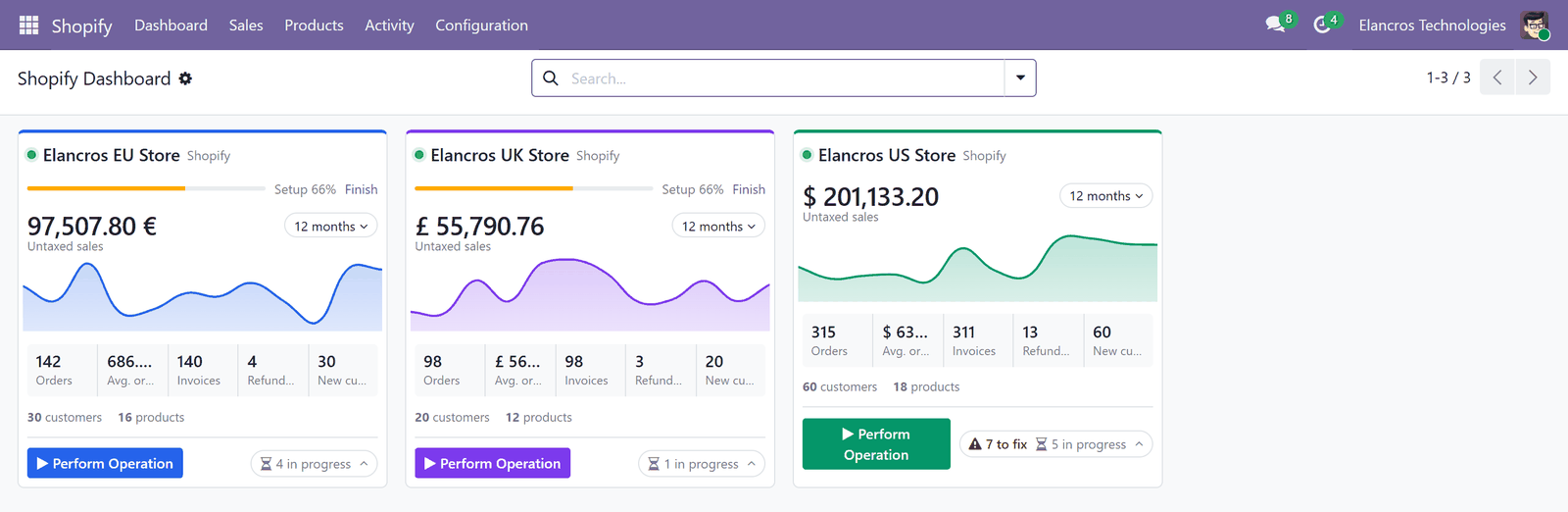
| Part of the card | What it shows |
|---|---|
| Sales and chart | Untaxed sales of the period, with the trend. Change the period with the button next to it. |
| Tiles | Orders, Avg. order, Invoices, Refunds, New customers of the period. Click one to open the records. |
| Setup bar | Shown until the setup is complete; Finish opens the missing settings. |
| Perform Operation | Runs an operation for this store. |
| Status line | to fix: orders that need attention and failed work; in progress: work running in the background. Click to open them. |
The card menu (⋮) opens the store, a configuration section, or changes the card's colour theme.
Sync Jobs
Shopify › Activity › Sync Jobs: every operation creates a sync job with one line per record (product, customer, order…).
| Job status | Meaning |
|---|---|
| Queued, Processing | Waiting for, or in, the background processing. |
| Completed | Every line is done. |
| Partially Completed | Some lines failed. |
| Failed | Every line failed. |
| Cancelled | Cancelled by you, or by archiving the store. |
A failing line never stops the others: it is retried, then marked Failed with its error, and the data it received is kept.
| Button | What it does |
|---|---|
| Process Now | Processes the job now instead of waiting for the background processing. |
| Retry Failed Lines | Runs the failed lines again, e.g. after you mapped a value. |
| Execute Line | Runs one line again. |
| Cancel Job | Cancels the lines not processed yet. |
Filters show the jobs From Schedulers or from webhooks.
Logs
Shopify › Activity › Logs: what each operation reported: Information, Warning, Error or Data Mismatch (e.g. a product not found). Each log links to its sync job and to the Odoo record. Tick Resolved once you have dealt with an error.
Store Requests
Shopify › Activity › Store Requests: every request that creates something on Shopify (a shipment, a product, an image, a stock quantity) is followed like a payment:
| Status | Meaning |
|---|---|
| Sending | Sent; Shopify has not confirmed it yet. The next run asks Shopify before sending again. |
| Done | Shopify did it; Store ID is the ID of what it created. |
| Failed | Shopify refused it, or it was still not done after 3 sends. |
| Replaced | Not found on Shopify; its values were sent again in a newer request (stock). |
Why
If Odoo or the network stops in the middle of a request, Odoo does not know whether Shopify did it. Instead of sending again blindly (and creating a second shipment or product), it first asks Shopify.
Bulk Imports
Shopify › Activity › Bulk Imports: imports larger than Large Import From (products, customers) or than Shopify's normal limits (orders). Shopify prepares the list in the background (Shopify is preparing the list), then Odoo queues it in batches (Importing) until Done. Records Found and Records Queued show the progress; the sync jobs it created are linked.
Received Events
Shopify › Activity › Received Events: the webhook events received from Shopify. See Webhooks.
Activities and chatter
- An order that needs attention gives an activity to the store's Responsible.
- Every change of a store's configuration is recorded in its chatter, with the old and the new value.